Pages pane down arrow example
In the  Edit tab,
the Pages pane displays a button that
looks like a down arrow. It is just below the current
page. The current page is a newly-added
page or another page that you clicked.
Edit tab,
the Pages pane displays a button that
looks like a down arrow. It is just below the current
page. The current page is a newly-added
page or another page that you clicked.
When you click it, a menu appears. Here is an example:
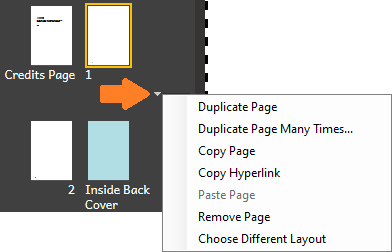
Normally, the commands are only available for use when the current page is an inside page.
These same commands appear if you right-click the page thumbnail.
Copy and paste an internal link (hyperlink)